Keeping reptiles and amphibians healthy requires consistent, species-specific care routines - feeding, misting, temperature adjustments, cleaning, and health checks. But with busy schedules and multiple enclosures, it's easy to lose track of what needs to be done when. Habitat Builder's Care Tasks & My Animals system makes it easy to stay on top of your animal care with automated notifications, detailed animal profiles, and a reliability score that tracks how well you're meeting your animals' needs. Premium users get the most streamlined experience with richer tracking and faster workflows.
How Care Reminders Work
Care reminders are automated tasks tied to your specific enclosures and animals. When you create a new enclosure in Habitat Builder, the system recommends species-specific care tasks based on the animal's requirements. You can customize the frequency (daily, every 2 days, weekly, etc.) and preferred time of day for each task. Additionally, you can track detailed information about each animal including gender, morph (color variant), birthday, and weight history - all accessible from the My Animals page.
Premium is ideal if you manage multiple animals and want deeper tracking, cleaner mobile workflows, and faster care planning.
Once you enable notifications in your browser settings, you'll receive automatic reminders when tasks are due. These notifications appear directly in your browser and on your device on supported browsers like Chrome, Firefox, and Edge on desktop, and native browsers on mobile when installed as a Progressive Web Application.
What's a Progressive Web Application (PWA)?
A Progressive Web Application (PWA) is a web app that works like a native app on your phone or computer. Habitat Builder is a PWA, which means you can install it directly on your home screen just like you would a native app from an app store.
Benefits of installing Habitat Builder as a PWA:
- Add to Home Screen: Open Habitat Builder in your browser, tap the menu icon, and select 'Add to Home Screen' (exact wording varies by browser).
- Native-Like Experience: Get an app-like interface without needing to download from an app store.
- Better Notifications: Installed PWAs receive richer notifications with better formatting and more reliable delivery.
Installing the PWA is optional - you can use Habitat Builder just fine in your regular browser. But if you want the best notification experience, installing it is highly recommended.
My Animals: Centralized Animal Management
The My Animals page gives you a centralized view of all your animals across all enclosures in one place. Each animal profile can track:
- Name and/or Number: Identify each animal uniquely
- Gender: Track male, female, or unknown with color-coded purple badges
- Morph: Document color variants and mutations with orange badges
- Birthday: Automatic age calculation displayed in blue badges
- Weight History: Integrated weight tracking charts to monitor growth
- Notes: Record health info, temperament, or special needs
- Enclosure Assignment: Animals can be assigned to enclosures or left unassigned for flexibility
Animals can exist without an enclosure and be moved between enclosures at any time. This is perfect for quarantine periods, temporary housing, or when reorganizing your collection. The mobile interface uses compact cards with quick-access buttons for weighing, editing, and removing animals.
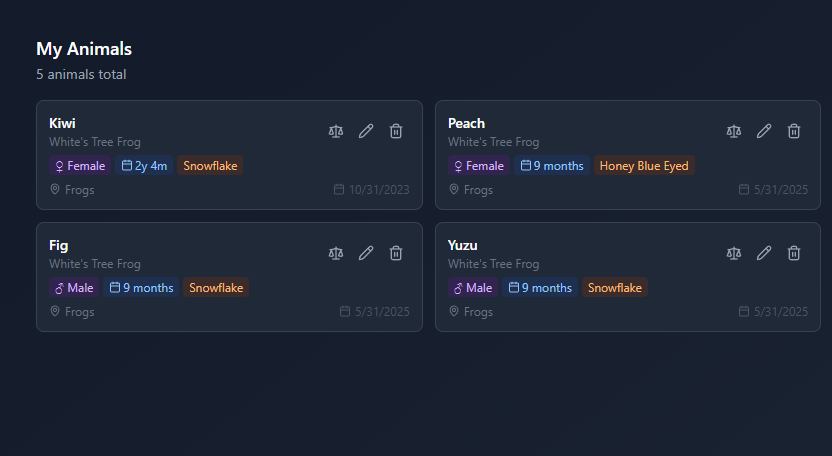
My Animals page: Track detailed information for each pet with profiles showing gender, morph, weight history, and notes
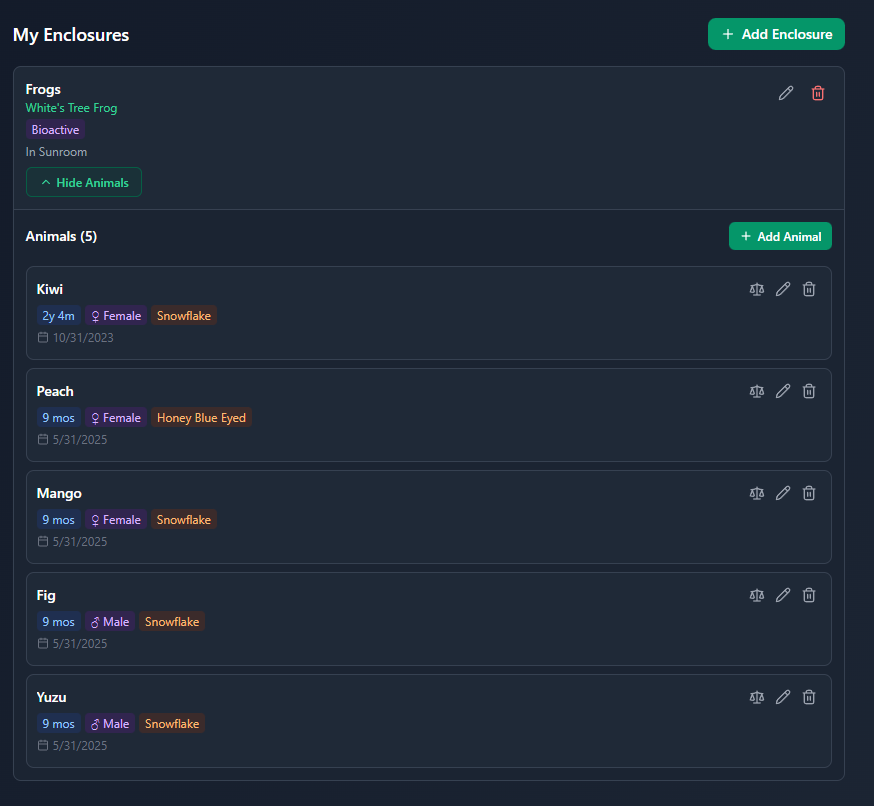
Centralized view: See all your animals across enclosures in one organized dashboard
Setting Up Care Reminders
Getting started with care reminders takes just a few minutes. Follow these steps:
- Create Your Enclosure: Start by adding your enclosure to Habitat Builder with animal species and setup type. This tells the system what care tasks your animal needs.
- Add Animal Profiles: From Care Tasks, expand your enclosure and add animals with their details (name, gender, morph, birthday). Or use My Animals to create animals that aren't yet assigned to an enclosure.
- Enable Notifications (One-Time Setup): When you first visit the Care Calendar, you'll see a prompt to enable notifications. Click 'Enable Notifications' and approve browser permissions. This only needs to be done once.
- Add Tasks or Use Recommended Tasks: The system can automatically create care tasks based on your animal's species requirements. Assign tasks to the whole enclosure or specific animals.
- Set Frequency and Time: For each task, choose how often it needs to be done (daily, weekly, every X days) and what time you'd prefer to be reminded. The system will notify you at that time on the due date.
- Receive and Complete Reminders: When a task is due, you'll get a browser notification. Use Selection Mode to bulk complete multiple tasks at once, or tap the checkmark on individual task cards.
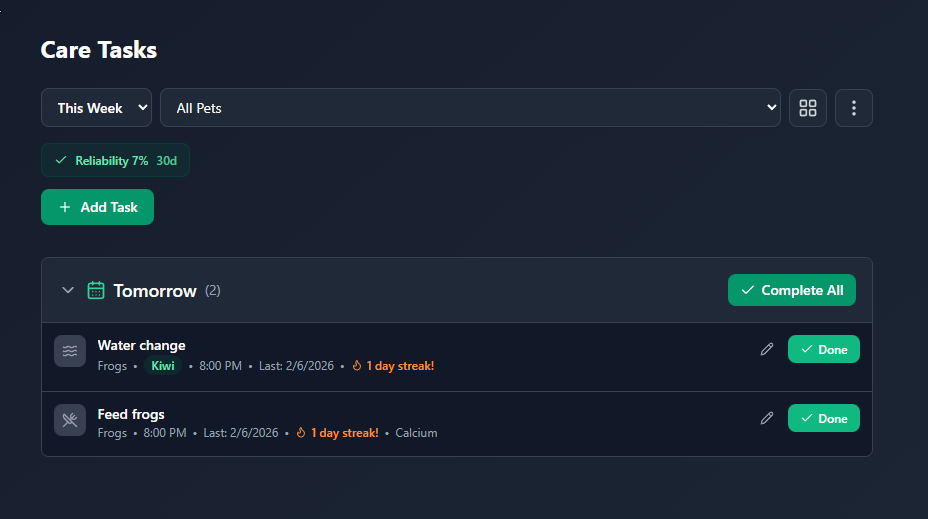
Care Tasks: Your daily care schedule with visual task cards and easy completion tracking
Types of Care Tasks
The Care Calendar supports several types of tasks, each with its own icon and color coding:
- Feeding: How often and what to feed. Critical for maintaining proper nutrition and preventing overfeeding.
- Misting: For species requiring high humidity. Reminders help maintain proper moisture levels for amphibians and tropical species.
- Water Changes: For aquatic and semi-aquatic animals. Maintains water quality and prevents ammonia/nitrite buildup.
- Cleaning: Spot cleaning and full enclosure maintenance. Prevents waste buildup and maintains a healthy environment.
- Maintenance: Equipment checks, filter changes, heat source verification. Ensures all gear is functioning properly.
- Health Check: Visual inspections for signs of illness, injury, or stress. Early detection can prevent serious health issues.
Understanding Your Care Reliability Score
At the top of your Care Calendar, you'll see a 'Reliability' score with a percentage and the timeframe (usually 30 days). This metric shows how well you've been keeping up with your scheduled care tasks.
The system tracks how many care tasks you completed versus how many were expected over the past 30 days. If you were supposed to feed your frog 30 times and completed 30 feedings, that's 100% reliability. If you completed 23 out of 30, that's 77%.
This score helps you identify patterns - maybe you're great at daily feeding but sometimes miss weekly water changes. Use it as a tool to improve, not as judgment. Life happens! The goal is to trend upward over time.
Managing Multiple Enclosures
If you have multiple enclosures, the Care Calendar features a compact single-row filter system optimized for mobile:
- View Mode Dropdown: Switch between Today, This Week, or All Tasks
- Pet Filter: Quick enclosure/animal selection with a dropdown menu
- Layout Toggle: Icon-only button to switch between card and list views
- Menu Button: Access Analytics and Selection Mode for bulk task completion
The reliability score automatically adjusts based on your filter. View all enclosures to see your overall reliability, or filter by enclosure to see how you're doing with a specific animal. The mobile interface auto-hides the header when scrolling down to maximize screen space, and shows it again when scrolling up.
Task Completion Options
You can mark tasks complete in multiple ways:
- Click the Checkmark: In the Care Calendar task list or card view, click the green checkmark to mark a task complete immediately.
- Selection Mode (Bulk Complete): Access from the menu button to select multiple tasks with checkboxes, then click 'Complete Selected' at the bottom to mark them all done at once. Perfect for completing morning routines.
- Click the Notification: When a reminder pops up, click it to mark the task complete (if your browser supports it).
- Swipe on Mobile: On mobile devices, swipe left on a task card to reveal the complete button, then tap it.
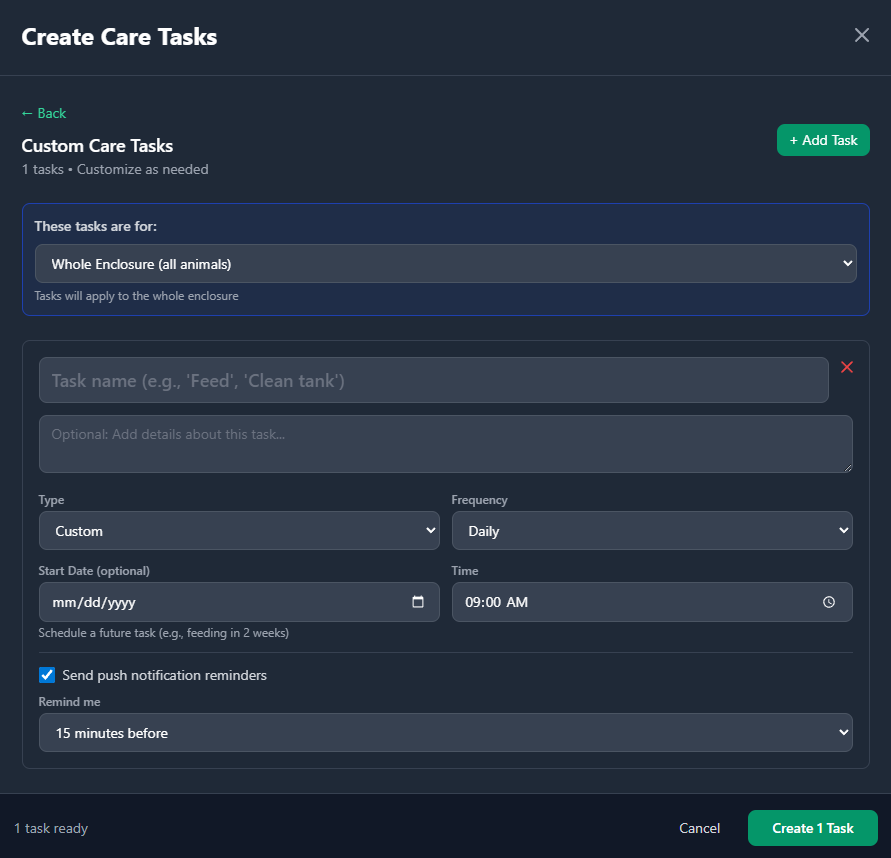
Task Creation: Create care tasks tied to specific enclosures and animals with customizable frequencies and notes
Customizing Your Reminders
Every task can be customized to fit your schedule and preferences:
- Frequency: Change how often a task repeats (daily, every 2 days, weekly, monthly, custom).
- Time of Day: Set the preferred notification time. Morning feedings? Evening misting? You control it.
- Notes: Add task-specific notes like 'Feed 3-4 crickets' or 'Check substrate moisture' to help you remember details.
- Task Type: Change the category to keep your tasks organized and easily recognizable.
Premium Care Tools
Premium keeps your care system efficient as your collection grows. It is built for keepers who want faster setup, richer history, and cleaner mobile workflows.
- Richer animal profiles and tracking over time
- Faster task setup and editing
- Cleaner mobile experience for daily check-ins
- Better visibility into your care history
Privacy & Data
Your care tasks and completion history are stored securely in your Habitat Builder account. Only you can see your tasks. The system uses this data to generate your reliability score and send timely reminders.
If you use multiple devices (phone, tablet, computer), your tasks sync automatically across all of them. Changes made on one device appear on all others within a few seconds.
Troubleshooting Notifications
Common issues and solutions:
- Not getting notifications? Check that notifications are enabled in your browser settings. Look for the Habitat Builder site in your browser's notification permissions and make sure it's set to 'Allow.'
- Notifications turned off? You can re-enable them at any time by clicking the bell icon in the Care Calendar header.
- Wrong time notifications? Verify that your device timezone is set correctly. Reminders are sent based on your local time.
- Task not showing as due? Make sure the task is enabled (toggle next to task name). Disabled tasks won't generate reminders until re-enabled.
Pro Tips for Success
- Start Simple: Begin with your most critical tasks (feeding, temperature checks) and add others once you have a routine.
- Match Your Schedule: Set reminder times that fit your actual routine. An 8 AM feeding reminder is only helpful if you're awake at 8 AM!
- Review Weekly: Once a week, check your reliability score. If it's dropping, consider simplifying tasks or adjusting frequencies to match your capacity.
- Log Notes: Add quick notes when completing tasks ('Ate 3 crickets,' 'Used Exo Terra substrate'). These help track patterns over time.
- Adjust as Needed: Animals' needs change with seasons and age. Review and update your care plan every 3-6 months.
What's Coming Next
We're constantly improving the care system. Future features we're exploring include:
- Push Notifications: Browser and PWA push notifications for reminders even when the app isn't open
- Feeding Logs: Track what food types you offer and monitor feeding responses
- Shed Tracking: Calendar-based shed tracking to monitor health patterns
- Photo Gallery: Upload and organize photos for each animal to document growth and color changes
- Export Care Logs: Download your care history to CSV for record-keeping or vet visits
- Shared Care Responsibilities: Invite family members or caregivers to share responsibility for your animals
Have questions or ideas for improving care reminders? We'd love to hear from you! Reach out through our contact form or community channels.
The best care schedule is the one you'll actually stick to. Start small, track your reliability score, and gradually build habits that keep your reptiles and amphibians healthy and thriving.